Content Section Plan
Status: SHIPPED — Implemented in PRs #560 (2026-06-11) and #562 (2026-06-12). This plan is kept for reference. The actual build exceeded the original spec:
/content/:slugdetail page, full Markdown body rendering,EMBED_ninteractive iframes, and PDF attachment download were all added beyond the plan's scope.
A dedicated Content section surfacing articles and presentations.
Design Decisions
| Decision | Choice |
|---|---|
| Section name | Content |
| Layout | Landing page mirroring Projects (spotlight + compact grid + filter bar) |
| Navigation | Both: nav link + home page "Latest Content" teaser (3 items) |
| Articles | Card links to external URL (new tab) |
| Presentations | Card opens inline modal — embedded PDF viewer or video player |
| Cover images | Seeded from OG image where available; placeholder SVG otherwise |
Architecture
Single Strapi v5 collection type content-post covers both articles and presentations via a content_type enum field. The frontend mirrors the Projects page pattern:
useContentPostsReact Query hook →GET /cms/api/content-posts?sort=published_at:desc&populate=cover_image,attachment/contentlanding page — spotlight card + compact grid + filter bycontent_typeandsource- Home page
ContentPreviewSection— latest 3 items, "View All" link - Nav link after "Projects" in
Navigation
Strapi Content Type
Collection: content-post
| Field | Type | Notes |
|---|---|---|
title |
String (required) | Headline shown on card |
slug |
UID (from title, required) | URL-safe unique key |
content_type |
Enumeration | article | presentation |
excerpt |
Text | 1–2 sentence teaser on card |
cover_image |
Media (single, image) | Card thumbnail |
published_at |
DateTime | Sort order |
tags |
JSON | Array of strings — filter chips |
external_url |
String | Article: link to source. Presentation: video embed URL (YouTube/Vimeo) |
attachment |
Media (single, file) | Presentation: PDF upload |
source |
String | e.g. "OneDNA", "Portfolio" — shown as badge |
featured |
Boolean | Pins to spotlight position |
Schema path: cms/src/api/content-post/content-types/content-post/schema.json
Shared Types
Extend shared/cms.types.ts:
export interface CmsContentPost {
  id: number;
  documentId: string;
  title: string;
  slug: string;
  content_type: "article" | "presentation";
  excerpt: string | null;
  cover_image: { url: string } | null;
  published_at: string;
  tags: string[] | null;
  external_url: string | null;
  attachment: { url: string; name: string } | null;
  source: string | null;
  featured: boolean;
}
React Query Hook
New file: client/src/hooks/useContentPosts.ts
import { useQuery } from "@tanstack/react-query";
import type { CmsContentPost } from "@shared/cms.types";

export function useContentPosts() {
  return useQuery<CmsContentPost[]>({
    queryKey: ["/cms/api/content-posts"],
    initialData: [],
  });
}
Frontend Pages & Components
/content — landing page
File: client/src/pages/content.tsx
Mirrors client/src/pages/projects.tsx:
- Hero section — "Content" heading, subtitle "Articles and presentations on cloud, data and AI."
- Stats row — total items, article count, presentation count
- Filter bar — "All" / "Articles" / "Presentations" tabs + source badges
- Spotlight card — featured or first item; same tilt + glow + reveal animation as Projects
- Article spotlight: "Read Article" button → opens
external_urlin new tab - Presentation spotlight: "View Slides" or "Watch" button → opens modal
- Compact grid — remaining items; same card layout as Projects compact cards
- Article card: source badge, title, excerpt, "Read" arrow →
external_urlnew tab - Presentation card: "Slides" or "Video" badge, title, excerpt, "View" arrow → opens modal
Presentation modal (ContentModal component, client/src/components/content-modal.tsx):
- Full-screen overlay, dark backdrop
- If
attachmentpresent:<iframe>embedding the PDF via the Strapi media URL - If
external_urlpresent (YouTube/Vimeo): responsive<iframe>embed - Close button (ESC key + click outside)
Cards with neither external_url nor attachment show the CTA disabled (muted, pointer-events-none).
Home page teaser
File: client/src/components/content-preview-section.tsx
- Heading: "Latest Content"
- 3 most recent items in a 3-column grid (compact card variant)
- "View All Content →" link →
/content
Inserted in client/src/pages/home.tsx below the Projects section.
Navigation
Add "Content" link to client/src/components/navigation.tsx after "Projects".
Route Registration
Seed Data
Initial entries to create in Strapi admin after first deploy:
Articles
| Field | DataOps article | Databricks article |
|---|---|---|
| title | DataOps: Breng DevOps naar je dataplatform in de cloud | Schaalbare data processing met Databricks: Hoe zet je het goed in? |
| content_type | article | article |
| source | OneDNA | OneDNA |
| external_url | https://onedna.nl/dataops-breng-devops-naar-je-dataplatform-in-de-cloud/ | https://onedna.nl/schaalbare-data-processing-met-databricks-hoe-zet-je-het-goed-in/ |
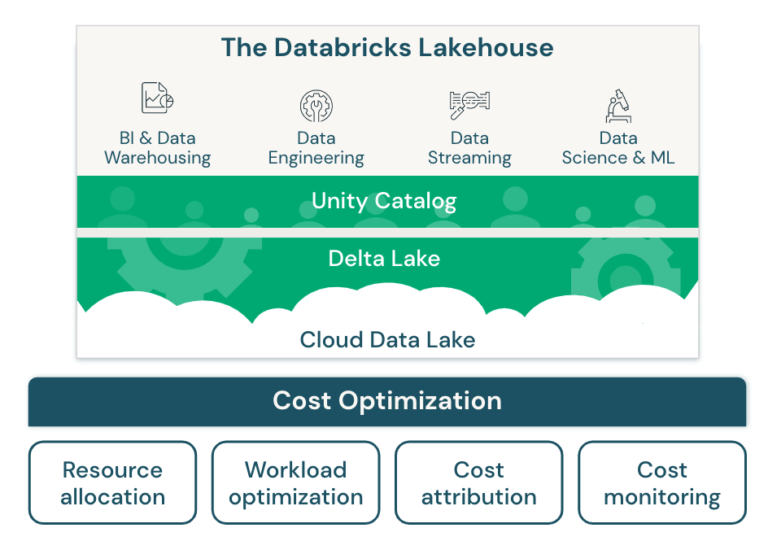
| cover_image | placeholder (OG image not extractable) | https://onedna.nl/wp-content/uploads/2026/01/cost-optimization-e1707938925588-768x541-1.png |
| tags | ["DataOps","DevOps","Cloud","Data Platform"] |
["Databricks","Data Engineering","Azure","Spark"] |
| featured | true (DataOps as initial spotlight) | false |
Presentations
Add manually when ready — upload PDF to Strapi media library or paste YouTube/Vimeo URL into external_url.
Build Sequence
| Step | Scope | File(s) |
|---|---|---|
| 1 | Strapi content-post schema |
cms/src/api/content-post/ (4 files: schema.json, controller, route, service) |
| 2 | Strapi public REST permissions | Strapi admin → Settings → Roles → Public → content-post: find, findOne |
| 3 | Shared CMS types | shared/cms.types.ts — add CmsContentPost |
| 4 | React Query hook | client/src/hooks/useContentPosts.ts |
| 5 | Presentation modal | client/src/components/content-modal.tsx |
| 6 | /content landing page |
client/src/pages/content.tsx |
| 7 | Home teaser section | client/src/components/content-preview-section.tsx + wire into home.tsx |
| 8 | Navigation link | client/src/components/navigation.tsx |
| 9 | Route | client/src/App.tsx |
| 10 | Seed data | Strapi admin — 2 articles + presentations when available |
Out of scope (phase 1)
/content/:slugdetail route — no in-app article reader; posts link externally- Dutch (
nl) locale — schema supports i18n but onlyenpopulated initially - RSS feed
- Comments / reactions
- Full-text search across posts